
How to Use Our Job Vacancy Finder Tool?

Searching for the right job in India can be overwhelming. Thousands of vacancies are available every month across different states, industries, and skill levels. The Job Vacancy Finder tool simplifies this process by helping job seekers quickly discover the latest employment opportunities based on personal preferences. This article provides a detailed guide on how to use the tool efficiently, from checking jobs to applying successfully.
How to Use Our Job Vacancy Finder Tool?
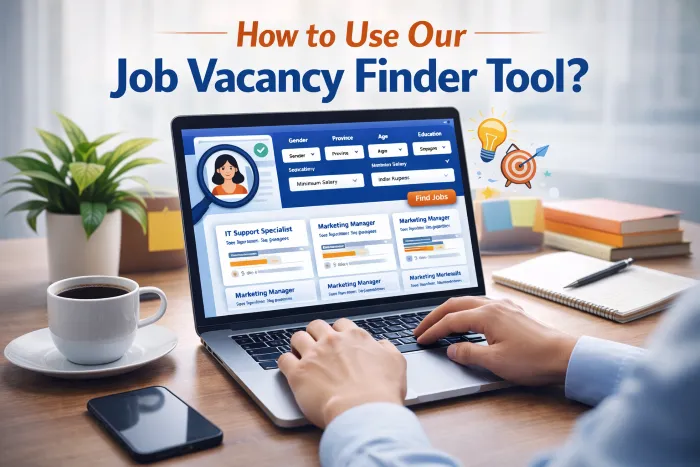
Step 1: Access the Job Vacancy Finder Tool
The first step is to access the Job Vacancy Finder tool on its official website. The tool is mobile-friendly and works on desktops, laptops, tablets, and smartphones. Users do not need an account to start searching for jobs.
Once the website is open, locate the tool section where the input form is displayed. The tool typically asks for a few essential details such as gender, province, age, education, and minimum salary.
Step 2: Fill in Your Personal Details
Gender
Select your gender from the dropdown menu. This helps the tool simulate opportunities suitable for different demographics. While job availability does not depend solely on gender, some listings or eligibility criteria may consider it.
Province
Enter the Indian state or union territory where you want to find a job. For example, you can enter Maharashtra, Karnataka, Delhi, Tamil Nadu, or Uttar Pradesh. Selecting a province ensures the search results are localized, making it easier to identify jobs near your preferred location.
Age
Enter your age in years. The age input helps filter certain roles that have specific eligibility criteria. For instance, some government or internship programs may require applicants to be within a certain age range.
Education
Select your highest education level from the dropdown menu. The Job Vacancy Finder tool supports all levels of education, including:
- Matric (10th Pass)
- Intermediate (12th Pass)
- ITI
- Diploma
- Bachelor Degree
- Bachelor of Engineering
- Master Degree
- MBA
- MPhil
- PhD
Education selection ensures the job listings match your qualifications. Candidates with higher degrees may see advanced opportunities, while those with basic qualifications can focus on entry-level jobs.
Minimum Salary
Enter the minimum salary you expect in Indian Rupees (INR) per month. The tool filters jobs to meet your salary requirements, allowing you to focus only on positions that align with your financial goals.
Step 3: Generate Job Listings
Once all the details are filled in, click the “Find Jobs” button. The Job Vacancy Finder tool will process your inputs and display relevant job options. The tool shows a list of job titles, company names, salary range, location, and required education.
Each job listing also includes a link that directs you to a Google search with live listings, giving you access to real-time opportunities. The tool may generate multiple results, typically between 5 to 10 positions per search.
Step 4: Review the Job Details
Carefully review each job listing. Focus on the following information:
- Job Title: Understand the role and responsibilities.
- Company Name: Check the reputation and credibility of the organization.
- Location: Verify whether the job is in your preferred province or city.
- Education Requirements: Ensure your qualifications match the job criteria.
- Salary: Confirm that the salary meets your expectations.
Reading each listing thoroughly prevents applying for unsuitable jobs and saves time during the application process.
Step 5: Visit the Job Link
Click on the provided link for each job to access live listings. The link redirects you to Google or the company’s official website, where you can see more details about the vacancy. This may include application deadlines, additional eligibility criteria, and required documents.
Using live links ensures that you get updated and accurate information about the positions, rather than relying solely on the tool’s simulated data.
Step 6: Prepare Your Resume
Before applying for jobs, prepare a professional resume tailored to your qualifications and skills. A well-structured resume increases your chances of being shortlisted. Include the following elements:
- Full name and contact information
- Educational background
- Work experience (if any)
- Skills relevant to the position
- Certifications or achievements
- Professional email address
Make sure your resume highlights relevant experience for the specific job you are applying to. Customize it for each application if necessary.
Step 7: Apply for the Job
Follow these steps to submit your application:
- Visit the official application link provided in the live job listing.
- Fill in the online application form accurately.
- Upload your resume, cover letter, and any other required documents.
- Double-check all details before submitting.
- Submit the application and note the reference or confirmation number, if provided.
Always follow the application instructions exactly as mentioned in the job posting. Incorrect or incomplete applications may be rejected.
Step 8: Follow Up
After applying, it is essential to track your applications. Keep a record of the jobs you applied for and follow up if you do not receive a response within the expected timeframe.
Some companies provide contact emails or phone numbers for queries. You can politely follow up to check your application status. Maintaining professionalism in follow-ups improves your chances of selection.
Step 9: Prepare for Interviews
Once shortlisted, you may be called for an interview. Prepare by:
- Researching the company
- Practicing common interview questions
- Preparing examples of your achievements and skills
- Dressing professionally for in-person or virtual interviews
- Ensuring a quiet and stable environment for video interviews
Good preparation increases your confidence and improves your chances of success.
Step 10: Keep Your Profile Updated
Regularly updating your education, skills, and experience ensures that the Job Vacancy Finder tool provides the most relevant results. Repeat the search periodically to discover newly posted vacancies.
Monitoring the job market helps you identify opportunities early and apply before positions are filled.
Tips for Using the Job Vacancy Finder Tool Effectively
- Use accurate and complete information in the input form.
- Set realistic salary expectations to avoid filtering out suitable jobs.
- Try multiple searches with different provinces if you are open to relocation.
- Save links to interesting job listings for future reference.
- Keep your resume updated with new skills and certifications.
Advantages of the Job Vacancy Finder Tool
- Quick access to relevant job openings
- Filters jobs by location, education, and salary
- Supports multiple education levels and industries
- Provides live links to updated job postings
- Simplifies the job search process for freshers and experienced professionals